What is clipboard hijacking? The most underestimated crypto threat
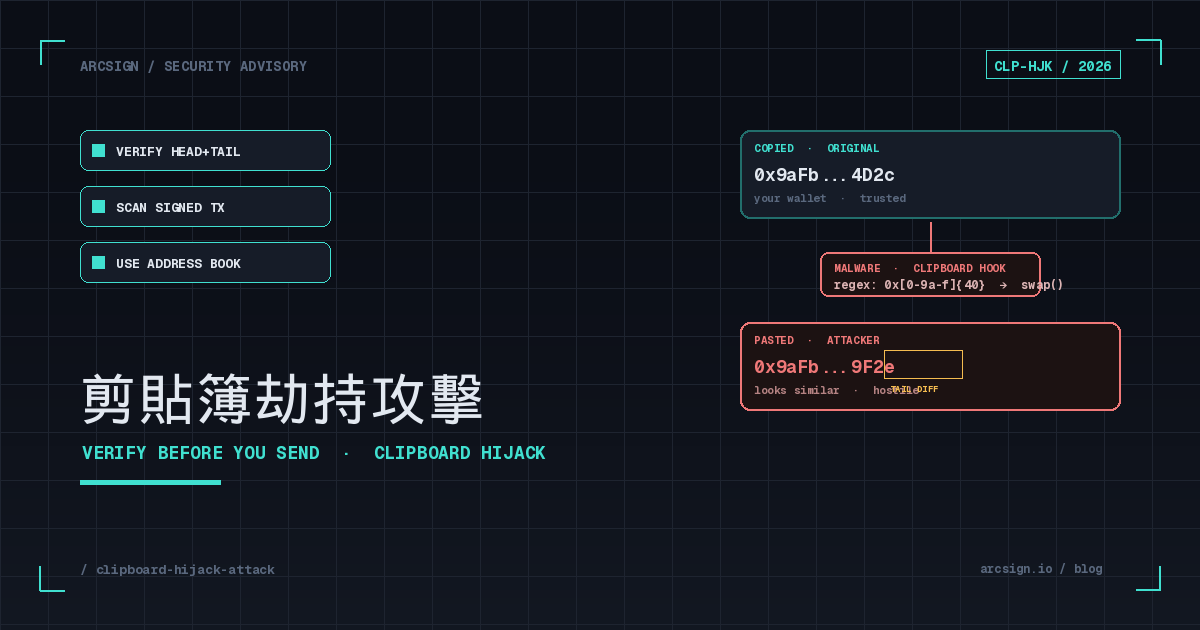
You open your wallet to send some USDT, copy the receiving address from your exchange, switch to ArcSign, and press Ctrl+V. The address appears — and it looks just like the one you copied (the first four and last four characters match). You confirm the transfer. Seconds later it lands on-chain at an address you’ve never seen before.
This isn’t a hypothetical. Kaspersky tracked a trojan called CryptoShuffler all the way back in 2017, which silently accumulated roughly $140,000 in Bitcoin using exactly this trick. Eight years later, the family tree has grown to dozens of strains — Laplas Clipper, ClipBanker, Mars Stealer, Vidar, and RedLine all bundle clipper modules — covering Windows, macOS, Android, and increasingly Linux desktops.
What makes it dangerous: you don’t have to do anything wrong. You don’t click a phishing link, you don’t enter a seed phrase, you don’t approve a malicious contract. You just copy and paste — something 99% of crypto users do every single day.
Why this article is worth the slow read
Clipboard hijacking sits at the perfect intersection of “user habit” and “attacker automation.” It doesn’t require a genius adversary, and it doesn’t care how secure your wallet is — it only needs you to “trust the address you see.” The goal of this article: after you finish, you’ll automatically take that extra glance every time.
How it works: from Ctrl+C to Ctrl+V
The clipboard is a shared OS memory buffer that any application can read from and write to. When you press Ctrl+C, the foreground app writes a string into it; when you press Ctrl+V, the destination app reads it. The problem: almost any process running on your machine can read or write the clipboard at any time, with no permission prompt on most desktop platforms.
Four-step attack flow
1. Initial access — usually via cracked software, phishing, or rogue extensions
Clippers almost always piggyback. Common entry points: cracked Adobe / Microsoft Office, fake “TradingView Pro premium” archives, “free NFT mint scripts” shared on Discord, or Chrome Web Store extensions impersonating wallet utilities. Once executed, the malware adds itself to startup.
2. Persistence — register a clipboard listener via OS APIs
On Windows, the malware calls SetClipboardViewer or AddClipboardFormatListener; on macOS it polls NSPasteboard; on Android it hooks ClipboardManager.OnPrimaryClipChangedListener. Whenever the clipboard contents change, the OS notifies the malware.
3. Detection — regex match against address formats
The malware ships with a regex table for known chains:
• EVM: ^0x[a-fA-F0-9]{40}$ (Ethereum / BSC / Polygon / Arbitrum…)
• Bitcoin: legacy ^[13], SegWit ^bc1q, Taproot ^bc1p
• TRON: ^T[A-Za-z0-9]{33}$, Solana: base58 32–44 chars, Cosmos: bech32 prefixes.
On match, it advances to step 4.
4. Substitution — overwrite the clipboard with an attacker address
The malware picks a pre-generated address from a local pool (typically the one whose head and tail visually match the original most closely) and calls SetClipboardData to write it back. The whole sequence completes before the user presses Ctrl+V — no window pops up, no cursor flickers. Advanced strains will revert the clipboard back to the original after the paste, so the user can’t catch the swap by copying twice.
Lookalike address substitution: your eyes’ blind spot
Sophisticated clippers customize the attacker address so the first and last four characters look identical to the original:
What you copied:  0x9aFbD78C2A1F4ed8B312cE7a6f9D0E4A2c815B4D2c
What got pasted:  0x9aFb3E5B12C0D9a4F88B71eC3D2A5E9F0c4d729F2e
UI abbreviation:  0x9aFb...9F2e   ← only the last four differ!
Attackers maintain millions of pre-generated, head/tail-indexed addresses (computed via GPU vanity-address generation), and can look up a visually similar replacement in milliseconds. If you only check the abbreviated form most UIs display, you have almost no chance of catching it.
Real cases: CryptoShuffler, Laplas, ClipBanker
Clipboard hijacking is anything but theoretical — the in-the-wild record stretches back over a decade:
| Family / event | Period | Platforms | Documented losses | Distribution |
|---|---|---|---|---|
| CryptoShuffler | 2016–2018 | Windows | ~$140K (BTC, ETH, Monero, Zcash) | Pirated software, malvertising |
| ClipBanker | 2018–present | Windows / Android | Hard to estimate (still active) | Telegram fake wallet apps, sideloaded APKs |
| HEH botnet (Linux variant) | 2020 | Linux IoT devices | Undisclosed | SSH weak-password scanning |
| Laplas Clipper | 2022–present | Windows (MaaS) | Reported ~18 BTC + various tokens (2023) | Dropped by Smoke Loader / Amadey |
| MortalKombat ransomware + clipper | 2023 | Windows | Combined file encryption + wallet theft | Phishing replies to existing email threads |
| Typosquatted npm packages (colortabs / dropdown-tree-select) | 2024 | Web3 developer machines | Multiple incident reports (amounts undisclosed) | typosquatting npm install |
Worth noting: victims are not mostly beginners. Early CryptoShuffler victims included long-time miners; in 2023, security firm Cyble’s tracking of Laplas found a meaningful share of activity from users who clearly knew their cold-wallet workflows. The reason is simple — the more experienced you are, the faster and more reflexively you copy and paste.
Related reads
Clipboard hijack often pairs with phishing — the phishing email plants the malware, which then waits for your next transfer. We also recommend social engineering attacks to understand how attackers get you to “run the .exe” in the first place.
How to spot it: 6 visible warning signs
A clipper’s job is to not be noticed, but the attack chain still leaves traces. These six signals are worth paying attention to:
1. The pasted string “looks similar but isn’t identical”
The most direct signal: you just copied an address you remember starting with 0x9aFb, the pasted version has the right length and same prefix, but the middle or end “feels off.” This is not a perception bug — stop, re-copy from the source, and compare every character.
2. A browser or wallet extension prompts for “clipboard access” after install
Legitimate wallet extensions rarely need clipboard access (at most for the moment you press a “copy address” button). If something you thought was a wallet utility requests clipboardRead permission and triggers it on every tab switch, remove it immediately.
3. macOS ”⊕ XYZ pasted” notifications appear unusually often
macOS 12+ shows a notification whenever an app reads the clipboard. If an unfamiliar app name keeps appearing, that app is polling the clipboard in the background. Common culprits: pirated tools, untrusted screenshot helpers, “translation assistants” sideloaded outside the App Store.
4. Windows Task Manager shows an unsigned, no-window process with high CPU
Clippers themselves are lightweight, but the variants bundled with infostealers will continuously upload keystrokes and browser passwords, causing CPU spikes. In Task Manager, if you see an unsigned, iconless .exe consuming 5%+ CPU, upload its hash to VirusTotal for cross-checking.
5. Android shows “Background app accessed clipboard” notifications (Android 12+)
Android 12+ surfaces a system notification whenever any app reads the clipboard. If a recently installed “VPN” or “game booster” keeps triggering it, uninstall it immediately and run Google Play Protect.
6. Small test transfer succeeds but large transfer goes to a different address
Advanced clippers only swap when the amount exceeds a threshold (e.g., 0.1 ETH+), to avoid being caught by users who “test with 0.001 first.” A successful test isn’t a green light — re-copy and re-verify for the actual transfer too.
7-layer defense: from the OS to the last verification before signing
No single layer is bulletproof, but stacked defenses raise attacker cost dramatically. From shallow to deep:
| Layer | Practice | Difficulty | Effectiveness |
|---|---|---|---|
| L1 Source | Don’t run cracked software or unknown .exe / .dmg / .apk | Easiest | Blocks 80% of intrusions |
| L2 OS | Keep Windows Defender / macOS XProtect on, OS patched | Built-in | Catches known families |
| L3 Extension hygiene | Remove untrusted browser extensions, audit permissions periodically | Medium | Closes a major distribution channel |
| L4 Address book | Save common destinations to your wallet’s address book or exchange whitelist | Medium | Bypasses the clipboard entirely |
| L5 Full-string compare | Verify every character before transferring (not just head/tail) | Medium | The last human line of defense |
| L6 Test transfer | Send a 0.001 test before a large transfer and wait for confirmation | Medium | Partial (defeated by threshold-based clippers) |
| L7 Cold-wallet sign-time verification | Use a cold wallet like ArcSign that displays the full destination before signing | Built-in | The final line |
L4 Address book: remove the clipboard from the attack surface
Clipboard hijack assumes you need to copy an address. If your common destinations (your other wallet, your exchange deposit address, a partner’s payable account) are saved in an address book ahead of time, you pick them from a dropdown next time — and the clipboard step never happens at all. ArcSign ships with a built-in address book and labels; a few seconds of setup pays off forever.
L5 Full-string compare: train your eyes
UI abbreviations like “0x9aFb…4D2c” are convenient, but for clipper defense, expand them. A practical trick: split the full address into 5 segments of 8 characters and walk through each with your finger or cursor. In a shared office, ask a colleague to second-check — two pairs of eyes are dramatically safer than one.
How ArcSign blocks clipper attacks for you
ArcSign’s signing flow is designed so that even if the host OS is compromised, you still have a chance to catch anomalies before signing:
1. Full address preview (no abbreviation)
The destination address — whether sourced from an exchange or a DApp — is shown in full 42 characters on the signing confirmation screen, with a space every 4 characters (e.g., 0x9aFb D78C 2A1F 4ed8 B312 cE7a 6f9D 0E4A 2c81 5B4D 2c) to minimize visual comparison cost.
2. USB-isolated confirmation
ArcSign is a USB cold wallet — the private key never leaves the USB device. Even if your computer is fully owned by malware, attackers can only modify what’s “displayed on screen” and “in the clipboard” — but the actual signing happens inside ArcSign and requires your hand on the confirm button. If the address looks wrong, don’t sign.
3. One-click address book
Any new address you type by hand can be saved to the address book with a label (“My Binance deposit”, “Andy”). Future transfers select from the list, never touching the clipboard.
4. Transaction simulation and warnings
For EVM chains, ArcSign simulates the transaction before signing, showing asset deltas. If the destination is flagged as a known scam or recent suspicious-activity address, the UI surfaces a red warning.
Defense-in-depth philosophy
ArcSign’s overall security architecture is “zero trust” — never assume your host is clean, never assume the clipboard hasn’t been tampered with, never assume the page-rendered address is genuine. Every signature returns the verification authority to your eyes and your finger. Combined with XOR three-shard encryption and mlock memory protection, the private key itself is never exposed to malware.
Already sent the wrong address? Emergency response
On-chain transactions are irreversible, but the first few minutes to hours determine how much you can salvage:
1. Stop using the affected device
Don’t make any more transactions, don’t try to “rescue the rest” — the malware may still be active. Disconnect from the network and preserve the device for forensics.
2. Tag the attacker address and notify exchanges
On Etherscan / BscScan / Tronscan, find the destination address and use “Update Address Tag” to mark it as “Reported Stolen.” In parallel: • If the funds move into a centralized exchange (Binance, Coinbase, OKX, Bybit, etc.), notify the exchange’s compliance contact immediately. • If USDT or USDC is involved, you can request a freeze from Tether or Circle (a police report is usually required).
3. Build a fresh wallet on a clean machine
Your seed phrase and .arcsign backup are likely still safe (clipboard hijack doesn’t steal private keys), but as a precaution, build a new ArcSign wallet on a confirmed-clean computer and migrate any remaining assets over. Then thoroughly reinstall the compromised device.
4. File a report and consider on-chain forensics
File a police report locally and, in the US, with the FBI’s IC3. Keep all TX hashes and screenshots. For sizable losses, consider reaching out to a chain forensics firm (Chainalysis, TRM Labs, Elliptic) — typically routed through your lawyer or a partner exchange rather than directly.
Don’t fall for “recovery” scams
A common follow-on scam: someone claiming to be a “blockchain investigator” or “asset recovery firm” DMs you offering to recover funds — for an upfront fee. Legitimate forensic services never DM you on Telegram first. Anything asking for upfront payment, a seed phrase, or installing additional software is a second-stage scam.
FAQ
Q: What exactly is a clipboard hijacker?
A clipboard hijacker (or “clipper”) is malware that monitors your system clipboard. When it detects a wallet-address-shaped string (0x… for EVM, bc1 for Bitcoin SegWit, T… for TRON, etc.), it instantly replaces it with an attacker-controlled address. Notable families include CryptoShuffler, ClipBanker, and Laplas Clipper.
Q: Why is clipboard hijack so hard to notice?
Modern clippers use vanity-address dictionaries to swap your address with one that matches the first four and last four characters of the original. Most wallet and exchange UIs only show abbreviated addresses (like 0x9aFb…4D2c), so a quick glance shows what looks like “the same” address — even though every character in the middle has changed.
Q: Does using a cold wallet protect me from clipboard hijack?
A cold wallet protects your private key from exfiltration, but it does not automatically prevent you from sending assets to the wrong address. The clipboard swap happens on your computer the moment you paste — the cold wallet only signs what you confirm on screen. ArcSign’s signing flow displays the full destination address (no abbreviation), the amount, and gas, and asks you to verify the head and tail before approving. That signing-time verification is the most reliable defense against clippers.
Q: I already sent funds to the wrong address — can I get them back?
On-chain transactions are irreversible. If the destination is attacker-controlled, you cannot reclaim it directly. What you can do: (1) flag the address on Etherscan/BscScan; (2) report to compliance teams at any centralized exchange the funds flow into — they may freeze deposits, especially for stablecoins like USDT/USDC where Tether/Circle can freeze under law enforcement requests; (3) file a police report and provide the TX hash; (4) treat the source device as compromised, build a fresh ArcSign wallet on a clean machine, and migrate remaining assets.