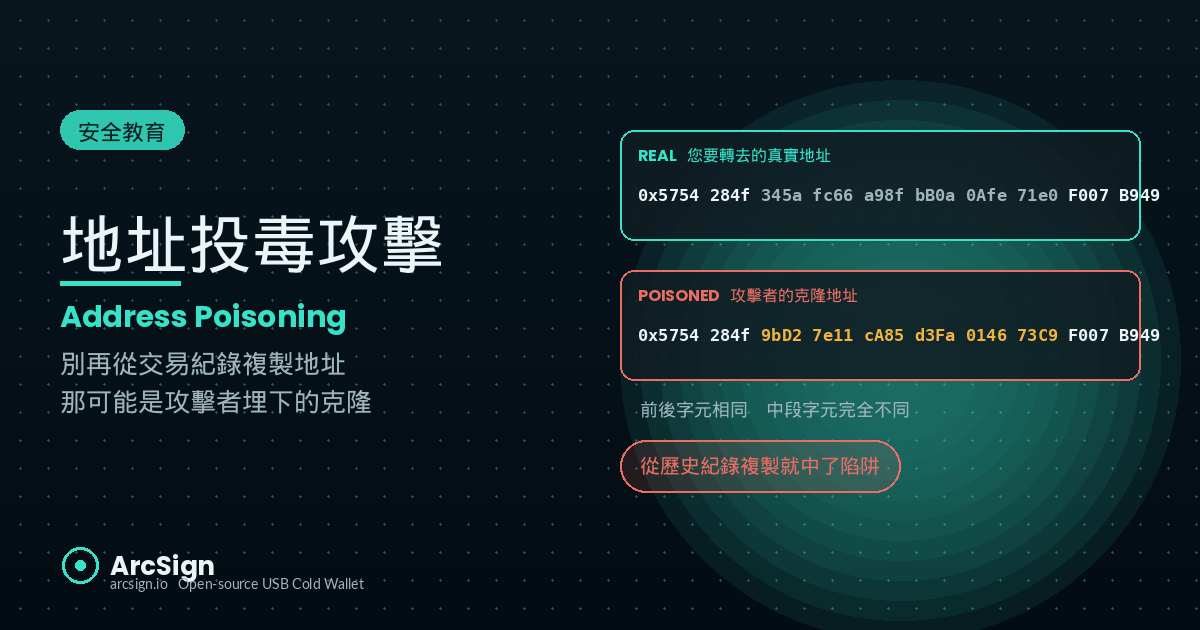
Do You Copy Addresses From Your Transaction History? That Is Exactly What the Attacker Wants
Here is something more than half of crypto users do every week: you open a block explorer or wallet UI, scroll to “Recent Transactions,” and copy the destination address from a previous successful transfer. On the surface, it is reasonable — if it worked last time, the address must be correct.
It is also the single fastest-growing on-chain scam vector in 2024 and 2025.
Address poisoning (sometimes called “address spoofing”) works without breaking into your machine, without phishing your seed phrase, without installing any malware. The attacker simply plants a fake-looking transaction in your transaction history, and waits for you to copy the bait the next time you need to send funds.
Web3 security firm Scam Sniffer logged the largest single victim loss to address poisoning on Ethereum mainnet at roughly $69 million in USDT — a whale who meant to transfer the equivalent of 1,155 WBTC to a counterparty and copied a poisoned address from history. Less than three months later, another $20 million loss followed the same pattern. And these are just the headline cases — Etherscan logs more than a million 0-value poison transactions every day.
Why This Is Worth Reading Slowly
Address poisoning sits at the intersection of human habit and social engineering. It does not require you to do anything obviously wrong — it just requires you to trust your eyes. The goal of this article: by the time you finish, you will never copy an address from history again, and every transfer will feel like the first one.
How the Attack Works: Cloning Your Transaction History
Address poisoning is not a technical breakthrough. It is a deeply cynical exploit of a single user habit: copying from history. The kill chain has four steps.
1. Target selection: monitor large wallets and their counterparties
Attackers run crawlers across mainnet and L2s, indexing every wallet holding more than a five-figure USD balance in stablecoins. They look at each wallet’s last 30 days of transfers and flag the counterparties that show up repeatedly — a CEX deposit address, a market maker hot wallet, a team multisig, an OTC desk. Those are the high-value paths worth poisoning.
2. Generate the clone: vanity prefix-and-suffix collision
Once the attacker has your frequent counterparty (e.g. 0x5754284f345afc66a98fbB0a0Afe71e0F007B949), they spin up a GPU rig running a vanity address generator. The goal: produce a new address whose first 4–6 and last 4–6 hex characters match the target. A consumer GPU finds a 4+4 match in under a minute and a 6+6 match within a day. To the attacker, this is a one-time fixed cost — the same clone can be aimed at every victim who sends to the same counterparty.
3. Send the poison: 0-value or dust transactions
The attacker now triggers a transaction that looks like it came from your wallet, deposited into the clone. Three common variants:
- 0-USDT transferFrom: calls the USDT contract’s
transferFromto move 0 tokens from your address to the clone. Because the amount is zero, no authorization is required and the transaction lands on-chain — yet Etherscan still records the event under your wallet’s history. - Fake-token airdrop: the clone fires a
transferevent of 1 fake “USDT” (actually a fork-contract spoof) to your wallet. UI implementations frequently render this in the “Sent” tab because the event’sfromfield is the clone, masquerading as you. - Tiny inbound transfer: the clone sends 0.0001 ETH to your wallet. The amount is too small to notice, but it permanently writes the clone into your wallet’s history.
4. Wait: catch you on a rushed day
Days or weeks later, you are sending a large transfer. You open the wallet, glance at recent transactions, see the familiar first-four and last-four characters, and copy-paste. Your eye skips over the 32 hex characters in the middle. You hit confirm. Twelve seconds later, the funds are in the attacker’s pocket. There is no recall on-chain.
Vanity Addresses: The Math Behind Your Visual Blind Spot
An EVM address is 160 bits — 40 hex characters. To force matching N characters at the prefix and N at the suffix, the average effort is roughly 16^(2N) attempts.
| Match length | Average attempts | Time on an RTX 4090 | Attacker cost |
|---|---|---|---|
| 4 + 4 | ~430 million | < 1 minute | essentially free |
| 5 + 5 | ~1.1 trillion | 1–3 hours | < $1 in electricity |
| 6 + 6 | ~2.8 quadrillion | ~5 days | a few dollars |
| 8 + 8 | ~1.8 × 10^16 | years | impractical |
The attacker’s sweet spot is 5+5 or 6+6 — visually indistinguishable to the human eye, generated at a price the attacker can absorb across thousands of campaigns.
Real Cases: Nine-Figure Losses on the Public Ledger
Address poisoning broke into mainstream awareness in 2024 because of a string of record-breaking incidents:
| Date | Victim | Loss | Notes |
|---|---|---|---|
| 2024-05 | Anonymous ETH whale | $69M USDT | Meant to send the USDT equivalent of 1,155 WBTC; copied a poisoned address from history |
| 2024-08 | DeFi institutional account | $20M USDT | 0-USDT poisoning, 6+4 vanity clone |
| 2024-10 | Individual trader | ~$3M | Cross-chain poisoning (Ethereum + Polygon); same victim hit on two chains |
| 2025-02 | Mid-tier foundation | $8.9M | Attacker even sent a spoofed “exchange notification” email about a new address |
| 2025-Q4 | Aggregate losses | $25–40M / month | Scam Sniffer rolling data — now a persistent background threat |
The May 2024 $69M case is famous because the attacker, after on-chain negotiation, returned roughly $62M in exchange for keeping 10% as a “fee.” This was a freakishly lucky outcome — the loss was so large and so traceable that the attacker chose to settle rather than face Chainalysis. The vast majority of mid-size victims never recover anything, because the attacker’s risk-reward only flips at headline-grabbing sums.
Related Threats Worth Reading
Address poisoning is often confused with clipboard hijacking, but they are different: clipboard hijacking is a Trojan on your device rewriting what you paste; address poisoning is an on-chain decoy rewriting what you see in your history. The former needs the device to be infected, the latter happens entirely on-chain. Read both, because the defenses are complementary. Also see phishing-attack-prevention and social-engineering-crypto.
Why Is This Attack So Hard to Spot?
Address poisoning works because it hits three cognitive blind spots simultaneously:
1. Truncated UIs: the interface is the attacker’s accomplice
Almost every wallet, explorer, and exchange truncates addresses to “first N … last N.” That was an aesthetic decision, but to an attacker it is a de facto specification: as long as the prefix and suffix match, the address is interchangeable in the eyes of the user. Etherscan’s default truncation is 4 + 4 — exactly the level a vanity address generator clears in under a minute.
2. The “I’ve used this before” anchor
Human brains heavily favor familiarity. When you see “Out: You → 0x9aFb…4D2c” in your history, your subconscious files this address as “used before, safe.” Clones exploit that anchor. They are not impersonating a stranger — they are impersonating your past self.
3. Time pressure
Almost every address-poisoning victim was rushing. A DeFi window about to close. An exchange deposit cutoff. A wire that had to clear before a meeting. Time pressure is the attacker’s best ally — it compresses the 30-second discipline of comparing 40 hex characters into a 3-second reflex of scroll-history-copy-paste.
Six Layers of Defense
There is no silver bullet for address poisoning, but stacking habits and tools dramatically raises the cost of attack:
| Layer | Practice | Difficulty | Effectiveness |
|---|---|---|---|
| L1 Source discipline | Always copy from the original source (counterparty message, official docs), never from transaction history | Easiest | Blocks 95% of poisoning |
| L2 Address book | Save every recurring counterparty to your wallet’s address book with a label | Medium | Skips the copy step entirely |
| L3 Full-string compare | Verify all 40 hex characters before signing, not just first-4-last-4 | Medium | Human last line of defense |
| L4 ENS / domain names | Use ENS (.eth) or equivalent in place of raw 0x addresses | Medium | Domain registry resists spoofing |
| L5 Test transactions | For large transfers, send 0.001 first and wait for counterparty confirmation | Medium | Catches most clones in practice |
| L6 Cold-wallet pre-signing check | Use a cold wallet (e.g. ArcSign) that shows the destination and requires deliberate confirmation before signing | Built-in | Final backstop |
L1 Source Discipline: Make “Copy From History” a Taboo
This is the single most important and most under-applied rule: never copy a destination address from your transaction history. Even if that transaction really was you, go back to the original source — the email or message your counterparty sent, the exchange’s deposit page, the contract’s official documentation — and re-fetch the address.
This habit alone blocks 95%+ of address-poisoning attacks, because the entire attack model assumes you will copy from history.
L2 Address Book: A One-Time Setup That Lasts Forever
If you send funds to the same exchange, the same OTC desk, or your own secondary wallet on a recurring basis, add them to your wallet’s address book and label them now. ArcSign’s address book supports multi-chain, supports labels, and supports import/export. Next time you transfer, you select “Binance Deposit” or “Alice (colleague)” from a list — the copy-paste workflow never happens.
L4 ENS: Human-Readable Names Instead of Hex Soup
ENS lets you replace 0x5754…B949 with alice.eth. Address poisoners cannot spoof an ENS name — domain ownership is enforced on-chain. The closest they can manage is a typo-squatted look-alike like alice-eth.eth, which is far more visually obvious than 0x collisions. For frequent counterparties, ask them to provide an ENS and use it.
L5 Test Transactions: $0.001 Worth of Peace of Mind
For any transfer above $10,000, always send 0.001 first and wait for the counterparty to confirm receipt. The attacker’s clone exists in your history, but nobody is monitoring it — your test will sit there forever, too small to bother moving. When you do not hear an “OK, received” from your counterparty, you know the address is wrong, before the big transfer ever happens.
How ArcSign Helps You Block This
ArcSign’s signing flow is designed so that even if your eyes have been deceived, the final signing moment gives you one more chance to catch it:
1. The destination is shown — verify it against the source
The signing confirmation page shows the destination address (truncated as 0x1234...5678, the way every wallet renders it). ArcSign can’t read your mind about which address you meant to send to — so the discipline that matters is yours: before you confirm, verify the full address against the original source (the counterparty’s message, the exchange’s deposit page), character by character, not against a truncated preview. The signing moment is your last checkpoint, but only if you check.
2. USB-air-gapped confirmation, with your finger on the button
ArcSign is a USB cold wallet. Private keys never leave the device, and signing requires inserting the USB and entering your password each time. Even if your browser, your wallet UI, and your block explorer have all been poisoned, the signature only happens in the ArcSign desktop app and only when you press confirm. If the address you see does not match the address you intend to send to, refuse the signature.
3. Address book with names and notes
Every counterparty you verify can be saved to ArcSign’s address book with a name and notes. Once it’s there, you select “Binance Deposit” or “Alice (colleague)” from a list on your next transfer instead of copy-pasting from history — which removes the exact step the poisoning attack depends on. This is a manual address book you curate, not an auto-recognition prompt.
4. Blacklist check on known-scam destinations (free)
Before releasing a signature, ArcSign checks the destination against an offline blacklist (OFAC + ScamSniffer + MetaMask phishing lists). If a poisoning clone has already been reported and tagged on those lists, the backend refuses to sign unless you explicitly acknowledge. This is free for everyone and works offline. (Note: a freshly generated vanity clone may not yet be on any list — which is why the source-verification habit in step 1 remains your primary defense.) For EVM transactions, ArcSign Pro can also simulate the transfer and preview the asset change before you confirm.
Defense in Depth
ArcSign extends zero-trust into the signing flow — but it’s honest about the limit: no wallet can know which address you intended. What it can do is keep your private keys in XOR three-share form and mlocked in memory so the key never leaks even if your OS is compromised, give you an address book so you never copy from history, and block known-scam destinations. The decisive defense against poisoning is still the upstream habit: always re-fetch the address from its original source.
Already Poisoned — or Already Lost Funds? Emergency Response
Address poisoning losses tend to be large (the attacker targeted high-frequency, high-value paths) and on-chain transactions are irreversible — but the first few minutes to hours still determine how much you can claw back.
1. Tag the attacker’s address on Etherscan immediately
Go to the relevant explorer (Etherscan / BscScan / Polygonscan / Arbiscan), find the attacker’s address, and use “Update Address Tag” to flag it as Reported Scam – Address Poisoning. This will not freeze the funds, but it warns other potential victims and accelerates the attention of on-chain forensics firms.
2. Report to stablecoin issuers and exchanges
If your loss was in USDT or USDC, immediately contact Tether (lawenforcement@tether.to) and Circle (compliance@circle.com) law-enforcement desks. Provide the transaction hash, the loss amount, and your police report number. Tether has frozen more than $2 billion in USDT in cooperation with on-chain forensics, and while individual response times stretch into weeks, partial recovery is real when the funds have not yet been laundered.
If the attacker has already moved funds into a centralized exchange, file an urgent compliance report with that exchange (Binance compliance@binance.com, Coinbase compliance@coinbase.com, OKX, Bybit all have dedicated channels).
3. File a police report and engage on-chain forensics
In the US, file with the FBI’s IC3 (Internet Crime Complaint Center). In the EU/UK, file with the relevant national cybercrime unit (NCA in the UK, EC3 in Europe). With a police case number, you can then approach Chainalysis, TRM Labs, or Elliptic — these firms generally only take individual cases via a law-enforcement or law-firm submission, but the case number opens the door.
4. Remove the poison from your interface
The on-chain record is permanent, but you can hide the clone from your day-to-day view. Many wallets and explorers offer “Hidden Tokens” and zero-value-transfer filters — enable them so dust and 0-value poison transactions stop showing up in your history. The broader fix is to stop using transaction history as an address source at all: rely on your address book and the original source instead.
Beware the Recovery Scam
After a public loss, expect strangers on Telegram or Discord claiming to be “crypto investigators” or “asset recovery agents” offering to retrieve your funds for an up-front fee. Legitimate forensic services never DM you out of the blue. Any request for upfront payment, your seed phrase, or installation of “recovery software” is a second scam riding on top of the first.
FAQ
Q: What is the difference between address poisoning and clipboard hijacking?
Clipboard hijacking happens on your device — malware monitors the system clipboard and substitutes the address at the moment you press Ctrl+V. Address poisoning happens on-chain — the attacker plants a fake transaction in your wallet’s history and bets you will copy it next time. Both end the same way (funds sent to a look-alike address), but the attack surface is different, and so are the defenses: cleaning your device fixes clipboard hijacking, but only changing your “copy from source” habit fixes address poisoning.
Q: How does an attacker make a 0-USDT transfer show up in my history?
The ERC-20 transfer event is fired by the contract and can be triggered by anyone willing to pay the gas. When the attacker calls the USDT contract to move 0 tokens, no authorization is required (the amount is zero), but the event is still emitted with the attacker-controlled from and to fields. Etherscan, MetaMask, and most wallet UIs then index this event under both addresses’ histories. This is a long-known design quirk of ERC-20 — since 2024 some wallets default-filter zero-value transfers, but coverage is still spotty.
Q: I use a cold wallet, am I safe?
A cold wallet protects against private-key exfiltration, but it cannot judge whether the destination is the one you meant to use. If you copied a clone from your history, the cold wallet will dutifully sign a transfer of your funds to the attacker. ArcSign shows the destination at signing time, lets you save verified counterparties to an address book (so you never copy from history), and runs a free blacklist check that catches destinations already reported as scams. But none of that knows your intent — so the best line of defense is upstream: build the habit of always re-fetching addresses from the original source.
Q: How do I tell real and poison transactions apart on Etherscan?
Several signals: (1) check the Method column — poison transactions usually show as Transfer but the contract is a clone of USDT rather than the real one; (2) check Value — 0 or sub-dust amounts are almost always poison; (3) click into the transaction details and verify from and to against your memory; (4) check the timestamp — poison transactions are usually fired 1–5 minutes after one of your real transactions, because the attacker’s crawler reacts to your activity. The cleanest defense is to enable Etherscan’s “Hide Filtered Transactions” toggle and exclude zero-value transfers from view by default.